
Your agent finishes a customer call. The customer wants a property visit on Saturday, help completing KYC, or a callback about an upcoming payment. What happens next?
If the recording stays in a dialer, the notes go into Excel and the follow-up depends on someone's memory, the conversation has created more administrative work than progress. Integrated calling software closes that gap by connecting phone calls with customer records and the processes that follow them. Agents can call from their workspace, review previous interactions and capture outcomes that guide the next action.
Cogover brings calling into the context of customer conversations and business operations. For teams handling sales enquiries, service requests or payment follow-ups, the value extends beyond making calls. It helps the team act on what customers say.
What Is Integrated Calling Software?
Integrated calling software connects voice communication with the system a business uses to manage customers and work. Instead of operating a separate dialer and manually updating a spreadsheet, agents can access calling alongside customer information, so call details and available recordings become part of the relevant interaction history.
A connected workflow brings together three elements:
- Customer context: who the customer is, previous interactions and the current business stage.
- Call activity: when the call happened, who handled it and whether it connected.
- Business outcomes: what the customer needs and what should happen next.
Consider a connected call that produces a request for a site visit. Recording that request against the enquiry makes it possible to assign the appointment and track whether the visit actually happens.
How Does Integrated Calling Work in Cogover?
The process starts with a customer record and continues through the conversation to its follow-up.
1. Open the Record and Click to Call
An agent reviews the customer's information and starts a call directly from the workspace. Click-to-call reduces the steps involved in copying numbers between applications, and it puts previous notes and interactions within reach before the conversation begins.
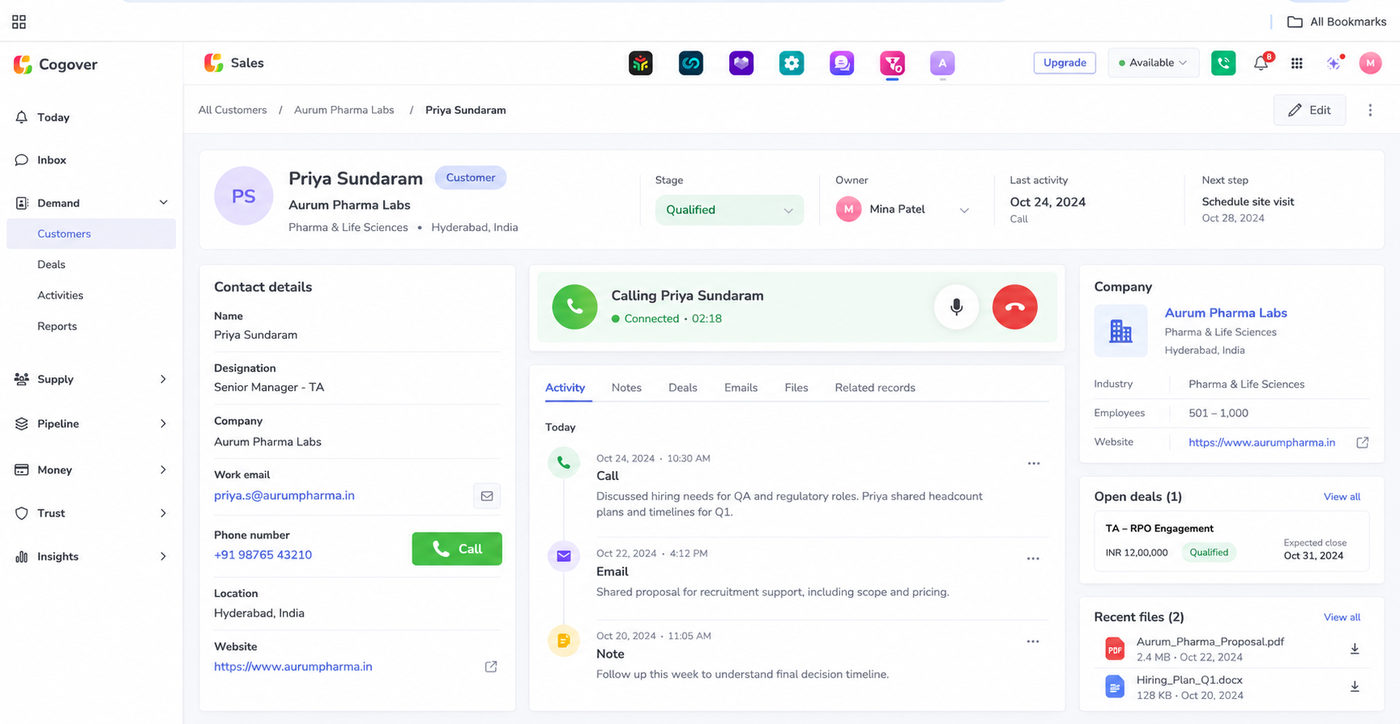
2. Capture Call Activity Automatically
Automatic call logging records details such as the agent, call time, duration and connection status. This reduces manual entry of basic activity data, while agents continue to capture the information that requires judgment: the customer's request, an agreed commitment, or the reason a case remains unresolved.
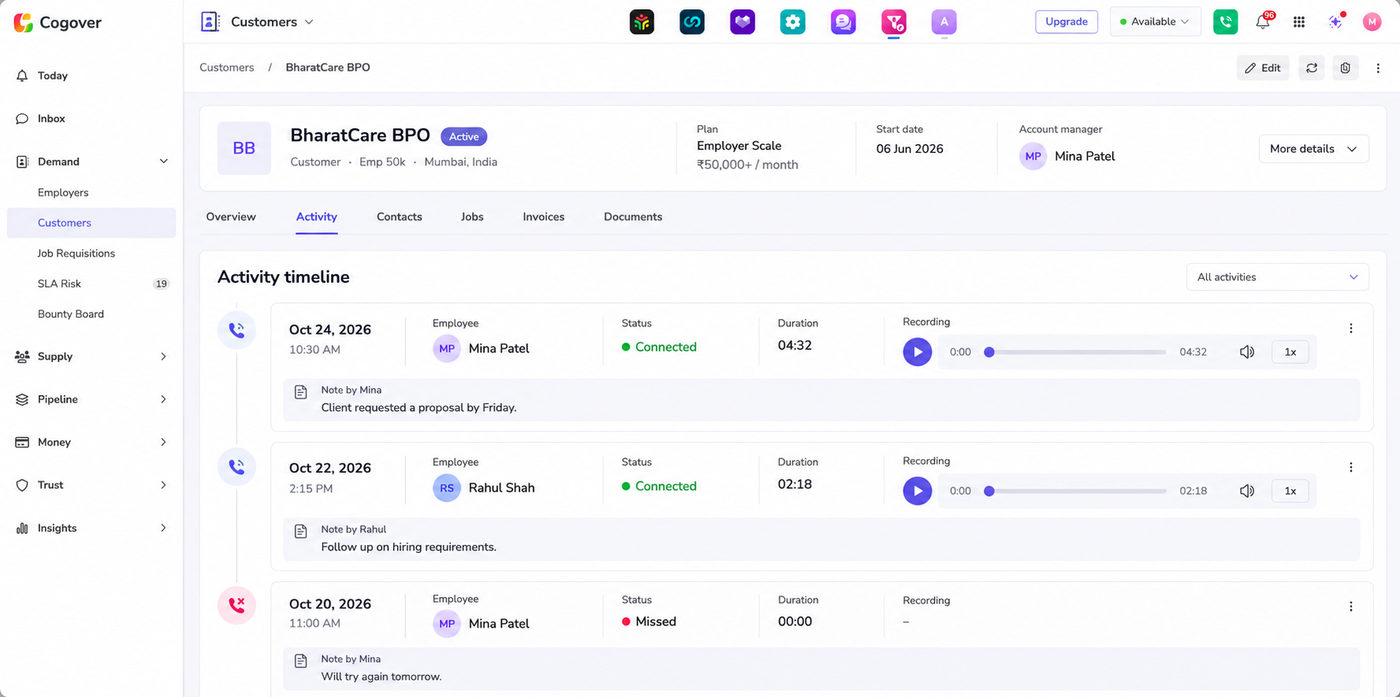
3. Keep Recordings with the Relevant History
Where recording is enabled, authorised users can access recordings alongside the associated customer interaction. A supervisor reviewing a complaint or coaching an agent can then examine the conversation in context, rather than searching an unrelated list of audio files.
4. Surface Context When Customers Call Back
Incoming calls can surface the customer's record and previous interactions, depending on the configured identification and routing setup. That context helps the agent continue an existing conversation instead of restarting it. A customer following up on an application should not have to explain the same issue from the beginning each time.
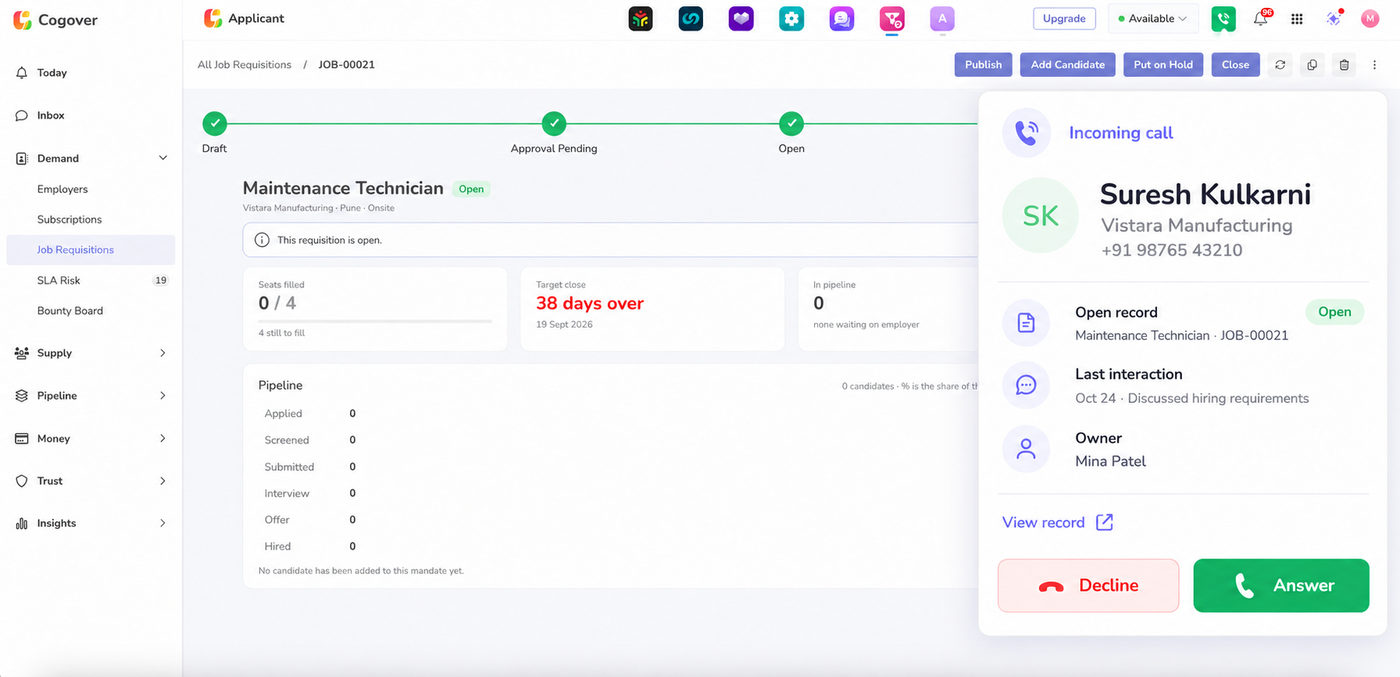
5. Use the Call Outcome to Start the Next Step
A completed call should leave the team with a clear next action. Configured workflows can use the selected outcome to create a callback task, update a record, assign another employee or initiate an approved message through a connected channel.
An outcome such as "site visit requested" needs more than a label to be useful. Capturing the project, the date and the responsible salesperson is what makes it actionable. The important connection is between what happened on the call and what the business does afterwards.
Benefits of Integrated Calling for Each Team
Different people need different answers from the same customer conversation.
| Role | Practical benefit |
|---|---|
| Agent or relationship manager | Access customer context, make calls and record outcomes with less switching between tools. |
| Team lead or supervisor | Review conversations, check follow-ups and identify cases that need attention. |
| Business head | Connect call activity with milestones such as visits, activations or resolved requests. |
| Quality or compliance reviewer | Find available recordings, interaction details and subsequent actions in context. |
Less Administrative Work for Agents
Agents should be able to see who needs attention, why they are calling and what happened previously. Shared records and callback tasks help organise that work: automatic logs reduce repetitive entry, while structured outcomes make handovers easier. If an employee is absent, another authorised team member can review the history and continue the conversation without starting over.
Better Coaching for Supervisors
Call counts reveal activity, but reviewing the conversation alongside its outcome reveals execution. A supervisor can check whether the agent understood the request, captured the necessary details and arranged the promised follow-up. Configured alerts can also highlight overdue tasks or unattended enquiries before they turn into complaints.
Clearer Business Reporting
Leaders need to know whether conversations produce progress. When call activity and business status are connected, teams can examine questions such as:
- Which lead sources produce completed site visits?
- Where do account applicants stop progressing?
- Which follow-ups lead to resolved service requests?
- How many payment commitments are subsequently fulfilled?
These measures make calling performance relevant to business decisions rather than to activity dashboards alone.
Integrated Calling Use Cases for Indian Businesses
The following examples illustrate workflows that can be configured around available integrations, business rules and approved communication channels.
Real Estate: From Property Enquiry to Site Visit
A property enquiry arrives from an advertising campaign, website or property portal. Before calling, the salesperson reviews the assigned owner, previous interactions and customer preferences, and that shared history helps reduce duplicate outreach and inconsistent follow-ups.
When the customer agrees to visit, the salesperson captures the project and appointment details, and a configured workflow can create the site-visit task and schedule a reminder. Afterwards, the same record holds the feedback and the next action, so the team can track the journey from enquiry through connected conversation and scheduled visit to completed visit.
Stock Brokerage: Follow Up on Incomplete Applications
A prospective customer expresses interest in opening an account but stops during KYC. The agent reviews the application context, calls the customer and records the obstacle. Depending on the configured process, that outcome can initiate approved instructions and create a callback.
During the next interaction, the agent can see what was discussed and what remains incomplete. Where application and account data are integrated, reporting can connect outreach with KYC completion and account activation.
Lending and Collections: Track Payment Commitments
A customer promises to pay a particular amount on a specific date. A structured outcome captures both details against the relevant record, and the configured workflow can schedule a reminder and assign a follow-up review. Where payment data is connected, the team can check the latest status before contacting the customer again.
This helps align follow-up activity with the actual obligation and payment history. Contact policies, restrictions and escalation rules must be defined and validated for the organisation's requirements before any of it goes live.
Where AI Can Support Customer Conversations
Call recordings contain useful information, but reviewing them manually takes time. Cogover's speech-to-text tooling supports English, Hindi and Vietnamese, and transcripts can support AI-assisted review, identification of customer needs and extraction of relevant details, with timestamps for checking the source.
Depending on the implementation, an AI process can help propose a callback date, classify a request or prepare information for an employee to confirm. Consequential updates should receive appropriate review before they trigger further action.
Teams should also test performance using representative calls, including mixed-language conversations, accents and background noise. Language support alone does not establish accuracy for every operating environment.
What Should You Check Before Implementation?
A useful evaluation covers the complete working process rather than the calling feature in isolation. Confirm:
- Calling setup: supported devices, numbers, providers and routing.
- Record association: how calls connect to the correct customer and business record.
- Workflow behaviour: which outcomes create tasks, update stages or initiate messages.
- Recording controls: notices, permissions, retention and storage arrangements.
- Integration scope: how customer, application, booking or payment updates reach the workspace.
- Reporting: which business outcomes can be measured from available data.
Recording and interaction history can support reviews and investigations, but they do not by themselves establish regulatory compliance.
How to Measure Integrated Calling Software in a Pilot
Start with one workflow and establish a baseline before changing it. A pilot of two to four weeks can compare:
| Metric | What it helps assess |
|---|---|
| Time from enquiry to first call | Responsiveness to new opportunities |
| Time spent updating records after calls | Administrative effort |
| Calls with completed business outcomes | Usefulness of captured information |
| Overdue callbacks or unattended enquiries | Follow-up reliability |
| Completed visits, activations or resolved requests | Business progress |
Measure automatic call logging separately from outcome completion. A system may record that a call connected while still requiring the agent to confirm what was agreed. Use the pilot results to decide what to improve before expanding to other teams.
Frequently Asked Questions
What is the difference between a dialer and integrated calling software?
A dialer enables calls. Integrated calling connects call activity with customer information and, where configured, the tasks and processes that follow the conversation.
Does automatic call logging replace agent notes?
It captures basic activity details automatically. Agents may still need to record the customer's needs, decisions and commitments, or confirm information proposed by AI.
Can a call outcome trigger a follow-up?
Yes, where the workflow is configured to do so. An outcome can create an assigned callback task, update a record or initiate another approved action.
Is integrated calling suitable for sales and service teams?
It can support both. Sales teams can connect conversations with enquiries and opportunities, while service teams can connect them with requests, ownership and resolution processes.
See How a Customer Call Becomes the Next Action
The most useful calling demonstration follows a complete customer interaction. Open a record, make the call, capture the outcome, then check the history and the follow-up task. Finally, confirm that the next employee knows what to do.
Book a Cogover demo with one real workflow, whether that is property enquiries, account applications or customer follow-ups, and explore how integrated calling can move that work forward.